Building a Data Agent — Part 2: Giving the Model a Workspace
I wanted to know how much structure a data agent really needed. In Part 1, I gave it separate roles for planning, analysis and review, along with tools and checks to guide its work. Some of that structure helped. But I also saw runs get caught in the process of checking and submitting an answer after the useful analysis was already done.
So I tried a simpler design. Instead of dividing the work between agents, I gave one model a workspace and a tool for running code. It could inspect the data, write a query or a program, look at the result and decide what to do next. I wanted to see what it could manage for itself, and where it would still need help. The experiments that followed took me from one tool, to adding specialised tools back, and then to a revised version of the simpler agent.
What one tool actually meant
The agent's job was to answer questions using data in files and databases. Its single tool, execute, let it run commands in a working directory. Through that tool it could use Python to write programs, SQL to query tables and ordinary command-line utilities to inspect files. One tool didn't mean one fixed operation: the model still had to decide what to do and write the code to do it.
Each task had its own workspace. The source data was read-only, but the agent could save scripts, intermediate tables and results, then come back to them in a later command. It could also read an error and try another approach. There were no separate planner, analyst or reviewer agents in this version; the same model worked through the investigation. I used GPT-5.6 Luna for these first workspace experiments.
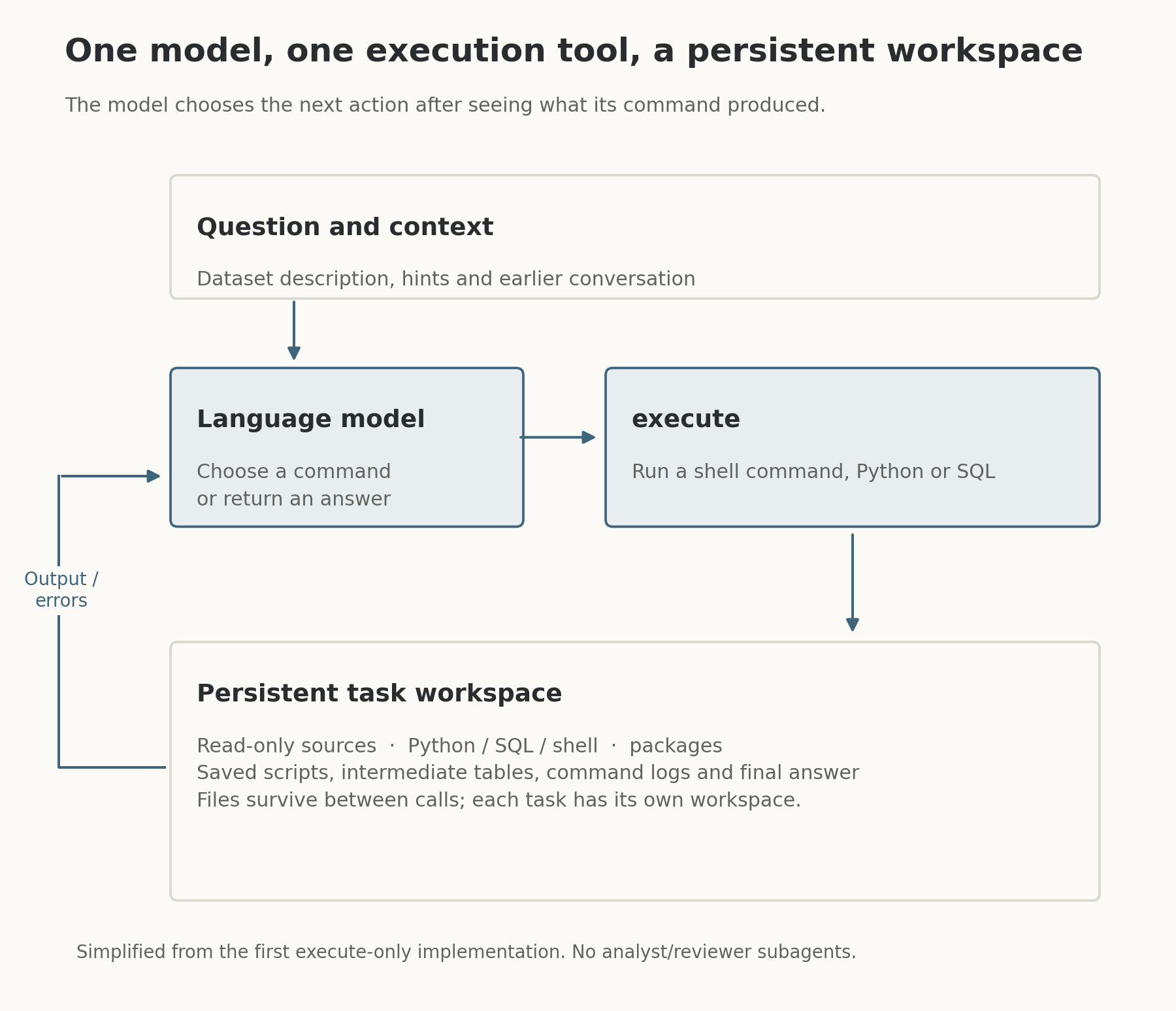
The workspace kept the agent's files and results available between calls. This is a simplified view of the first execute-only implementation, rather than a trace of one particular run.
To see how the agent performed, I used DataAgentBench, a benchmark that checks answers to data-analysis tasks across different datasets. A passing result means the submitted answer met the benchmark's checks. My early workspace experiments used a larger local collection; the later comparisons used the benchmark's official set. Those are different groups of tasks, so I didn't treat their scores as directly comparable.
The model could do the work, but it also had to prepare it
The workspace gave the model room to solve problems I hadn't anticipated when designing the tools. It could inspect unfamiliar files, write a loader, join tables and revise its code when something went wrong. But it also had to do all the setup itself. On a movie-data task, for example, the agent needed to load a large database export before it could begin the analysis. Its first loading attempts timed out; it changed its approach, recovered and eventually produced a passing answer. That was encouraging, but a lot of the run had gone into making the data usable.
The early evaluation was interrupted by errors from the model service, leaving many tasks without usable results. The completed runs still gave me something useful: I could see both the flexibility of the workspace and the cost of asking the model to repeatedly prepare data. They also showed that writing and running code didn't guarantee a correct answer. Some failures involved matching records, interpreting the task or classifying text after the data was already available.
Why I added some tools back
I started to wonder which work the agent should keep doing itself and which work could be made easier for it. If several tasks used the same database export, for instance, the system could prepare the tables once and make them available again. For repeated text classification, a dedicated tool could save results in a consistent format with links back to the original records. I added those capabilities alongside the code-running tool, plus a submission tool that checked saved results before accepting an answer. I called this the four-tool hybrid.
The model still directed the analysis; I hadn't brought back the separate planner and reviewer agents. The idea was to remove some repetitive setup while giving it a way to work with data through code when needed. Smaller tests showed the appeal: prepared tables made a large source more manageable. But making data accessible didn't resolve every problem. The agent could still select the wrong records or misunderstand what an answer needed to include, and the extra machinery introduced its own behaviour to inspect.
What happened when I compared the designs
I compared the hybrid and one-tool designs on the same official benchmark tasks, using two different language models in separate experiments. With Luna, the one-tool version with written analytical guidance passed more tasks than the hybrid. With Muse Spark, the hybrid and an older one-tool version were close, with the hybrid slightly ahead. The chart shows the results for each comparison.
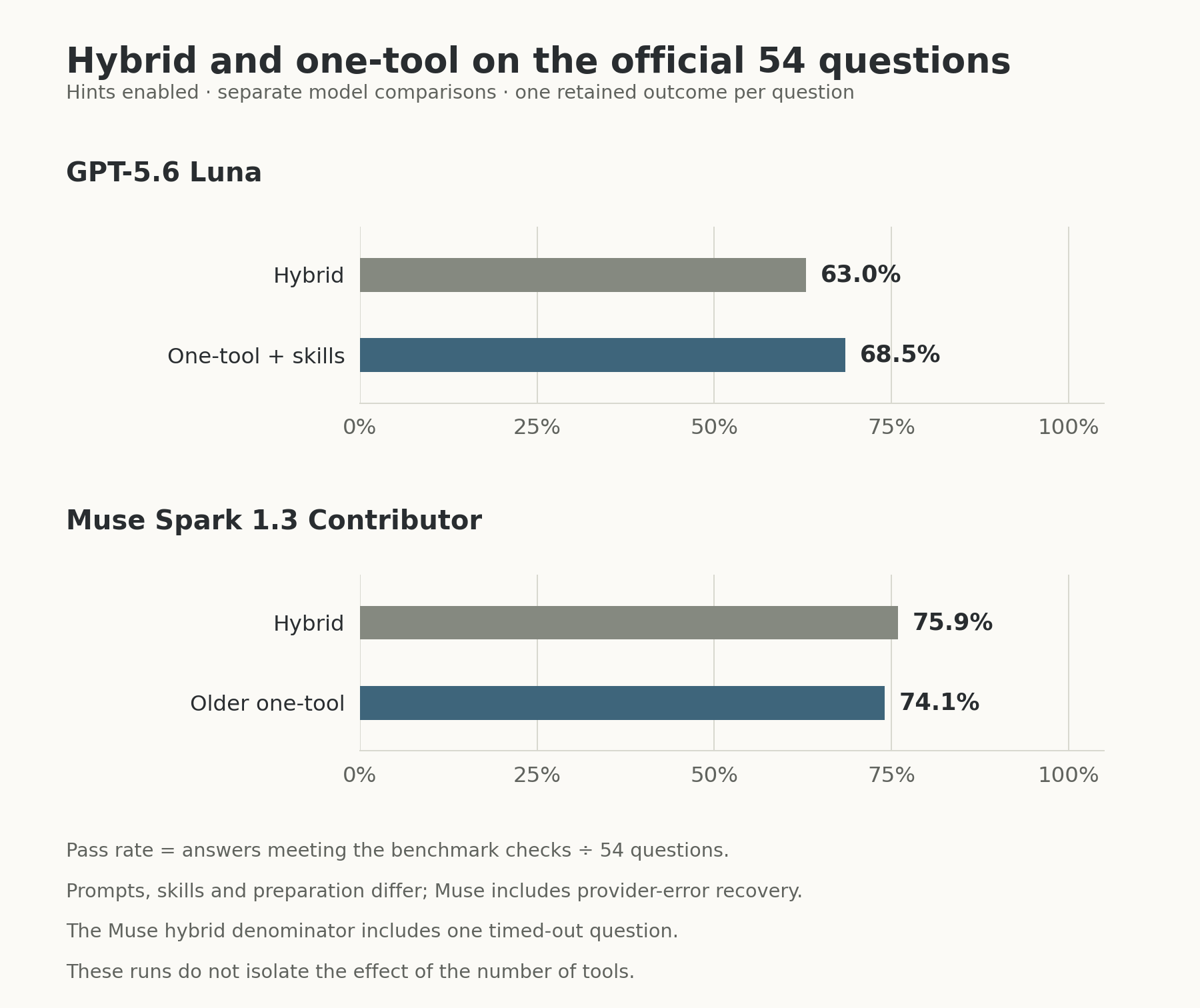
The designs used the same official tasks within each comparison, with hints enabled. Their prompts, written guidance and data preparation differed. The Muse results include recovery after service errors and one hybrid timeout, counted as a non-pass.
I can't say the differences were caused by the number of tools. The designs also differed in their prompts, written guidance and data preparation, and some Muse runs needed recovery after service errors. What I could say was that the specialised tools hadn't consistently produced better answers in these experiments. They helped with some recurring work, but correctness still depended on the choices made during the analysis. The simpler agent was competitive enough that I wanted to keep working on it.
Getting the calculated result into the answer
As I reviewed the one-tool runs, I noticed another place where things could go wrong. The model could calculate and save a result, then omit a row or change a number while writing its final answer. I wanted a more reliable way to carry the result from the workspace into the submitted answer, so I added a small program that turned the saved result into the required output. It also recorded fingerprints of the files, allowing the evaluation code to check whether the saved result or answer had changed afterwards.
At the same time, I gave the agent clearer guidance on interpretations that could affect a calculation, such as which dates and records belonged in a total. In a later Muse run, this revised one-tool version passed more tasks than the older version. All of its answers went through the new output program, and the checks found no mismatches between the saved results and the answers produced. But I changed the guidance and the output program together, so the comparison doesn't tell me how much either change contributed to the higher score.
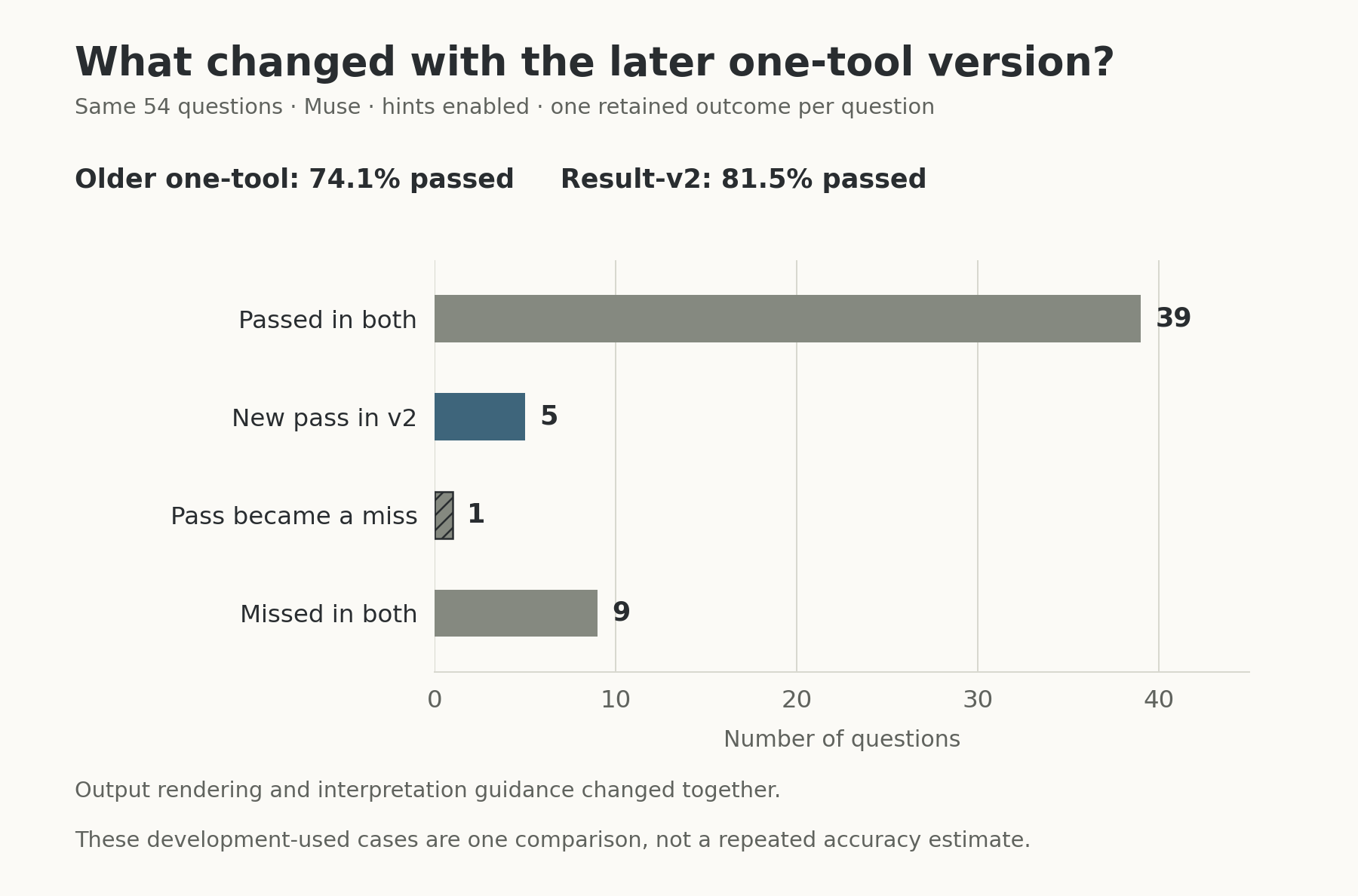
The chart compares outcomes for the same tasks. The older version's results came through a provider-recovery sequence; the revised version was a fresh run. Output rendering and interpretation guidance changed together.
This was useful progress, but it solved a particular problem: preserving what the agent had calculated. It didn't prove that the calculation itself was right. And because I'd used these tasks during development, I still needed to test how reliably the approach would work on unfamiliar data.
The mistakes the workspace couldn't fix
One failure made the distinction clear. The agent was asked to analyse news articles by category. It classified some stories about technology companies' finances as technology news, then calculated its answer from those labels. The saved result and the final answer matched, but the benchmark marked the answer wrong. The mistake had happened earlier, when the agent decided how to categorise the articles.
I saw a related problem when an agent checked a count by counting the same labels again. That could catch a calculation error, but it couldn't reveal that the labels themselves were wrong. Two steps can agree perfectly and still share the same bad assumption. That changed how I thought about checking: I needed to look at the records and decisions behind a result, not just whether the arithmetic could be repeated.
I kept working with the later one-tool agent because I could follow its commands, reopen its saved work and check how a result became an answer. The hybrid experiments also left me with a reason to make useful data preparation available when it saves repeated effort. More than anything, these runs taught me to ask where the work was going wrong before adding another layer to the agent. By then I also wanted to know how much of the agent machinery I needed to build myself, so I tried Codex on the same benchmark. That's where Part 3 begins.